
App store
An n8n-style flow builder
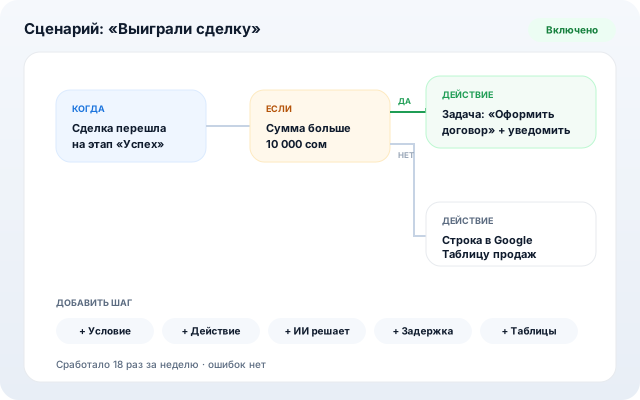
A visual automation builder: event → conditions → actions. Flows are assembled from nodes, AI nodes make judgment calls, webhooks connect external services.
For teams tired of manual routine: auto-tasks on deals, manager alerts, Google Sheets export, website-form reactions.
What it does
n8n-style canvas
Trigger, YES/NO condition branches, 40+ actions. A dry test run shows what would happen.
AI nodes
“AI decides” branches by meaning; “AI extracts” pulls fields out of free text.
Webhooks both ways
Inbound webhooks accept leads from any site; outbound HTTP calls external APIs. Google Sheets built in.
Delays & approvals
Flows can wait a day or ask a manager for sign-off.
Ready-made packs
Scenario bundles for sales, services, support and finance — installed in one click.
How to set up
- 1
Install “Automations” from the app store (PRO plan and above).
- 2
Build a flow in the editor or start from a ready-made pack.
- 3
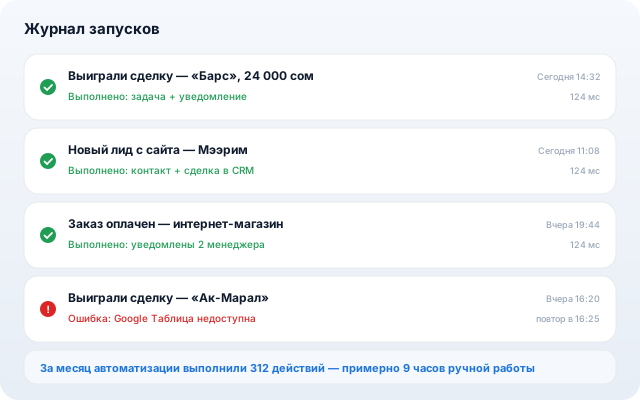
Dry-run it and switch the rule on — the journal logs every execution.
Other apps