
Channel
A live chat on your website
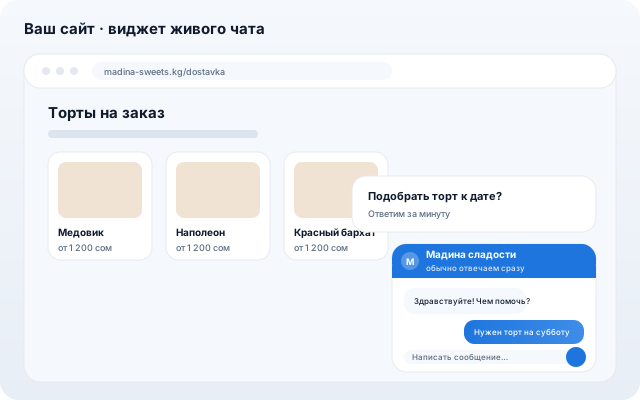
The chat widget goes on your site with a single snippet. A visitor writes — the message lands in the same inbox as WhatsApp, Telegram and email. AI answers on its own, and the operator sees which page the person is on and where they came from.
For websites with traffic: online stores, services, agencies. One website is free on every plan, including Free. No website? Share the chat page link in your Instagram bio or as a QR code in your venue.
What it does
One-line install
Copy the snippet — the chat bubble appears on your site. The widget runs in its own frame, so it never breaks your layout or styles.
Conversations in one inbox
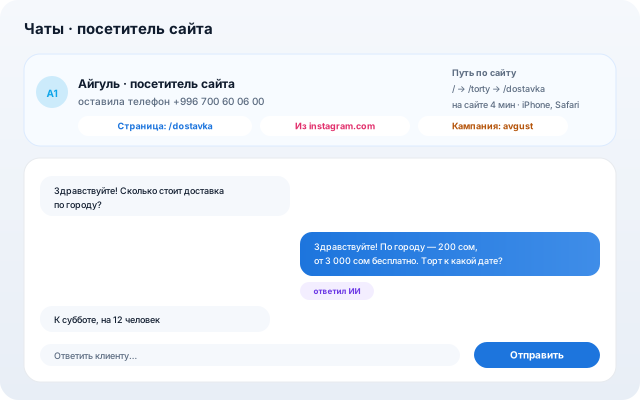
Website chats land where WhatsApp and Telegram already are: same tags, search, CRM intake and phone notifications.
AI answers 24/7
The AI sales agent knows your products, prices and knowledge base: it replies at night and hands the hard questions to a human.
You see who is writing
Above the conversation: the current page, the referrer, campaign tags, device and the path through your site. “How much is it?” stops being a riddle.
Proactive invites and intro form
After a few seconds an invitation pops up on the right page. The intro form creates the contact in your directory right away.
Working hours and handoff
Outside your hours we say honestly that nobody is around and collect a contact. The customer can continue in WhatsApp — both conversations stitch into one contact.
How to set it up
- 1
Add the “Website chat” channel in Chats → Channels.
- 2
Paste the snippet into your site — or share the chat page link if you have no site.
- 3
Set the colour, greeting, working hours and invitations — then reply from the shared inbox.
Other channels