
App store
Email and WhatsApp campaigns
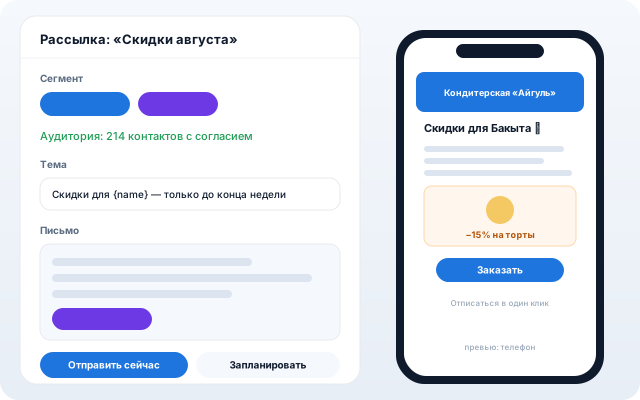
Campaigns over contact segments: name personalization, one-click unsubscribe, opens and clicks, scheduled sends. WhatsApp goes through your own channel.
For anyone building a customer base: promos, announcements, win-back campaigns. Consents live on the contact.
What it does
Segments from CRM
Statuses, tags, consents — audience counted live.
Responsive emails
A mobile-ready template plus AI email generation.
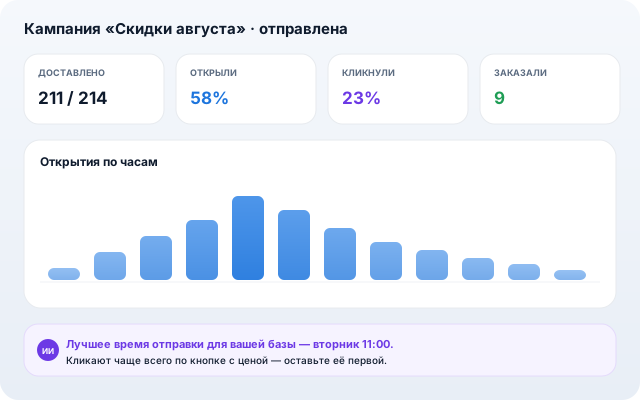
Honest analytics
Opens, clicks and unsubscribes per campaign and recipient.
WhatsApp & SMS
WhatsApp via your channel; official Cloud API uses Meta-approved templates.
Spam-safe
One-click unsubscribe and List-Unsubscribe headers.
How to set up
- 1
Install “Campaigns” from the app store (Standard plan and above).
- 2
Connect an email channel (your SMTP) or WhatsApp.
- 3
Build a segment, write the email (or ask AI) and launch.
Other apps