
App store
Warehouse accounting done right
Products with variants and photos, receipts and shipments, weighted cost, reservations for CRM deals, supplier orders, printable invoices and barcode labels.
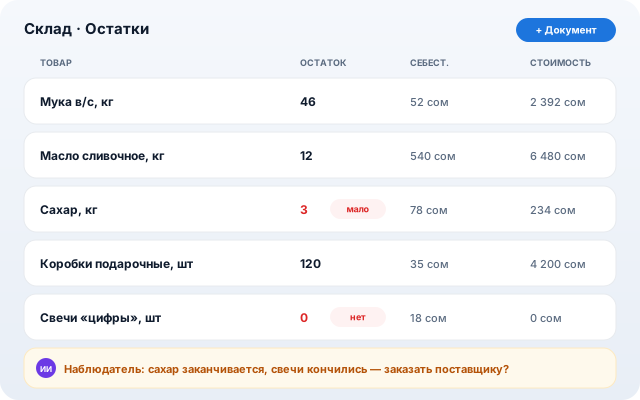
For trade and production: stock is always current, and the AI seller takes its catalog from here.
What it does
Document model
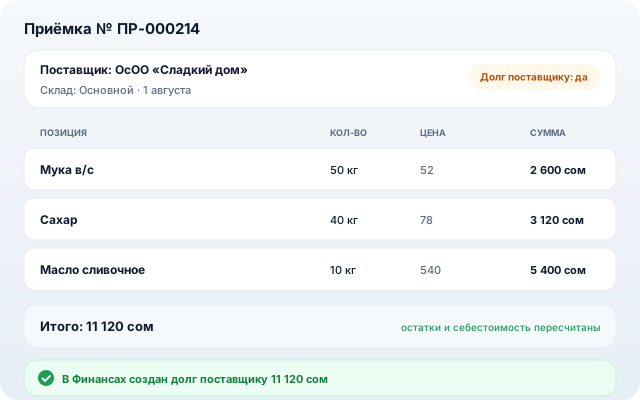
Receipt, shipment, write-off, transfer, stocktake — every document moves stock, history stays.
Product variants
Size, color, “whole cake / slice” — each variant has its own price, barcode and stock.
Deal reservations
Stock is held for a CRM deal: physical vs available quantity.
Purchasing & debts
Supplier orders received in one click; supplier debt lands in Finance.
Printing
Invoices and Code128 barcode labels right from the browser.
How to set up
- 1
Install “Inventory” from the app store (Standard plan and above).
- 2
Add products (or let AI read a delivery note photo) and make the first receipt.
- 3
Ship against deals — the observer warns when stock runs low.
Other apps