
App store
A register that knows your stock and your customers
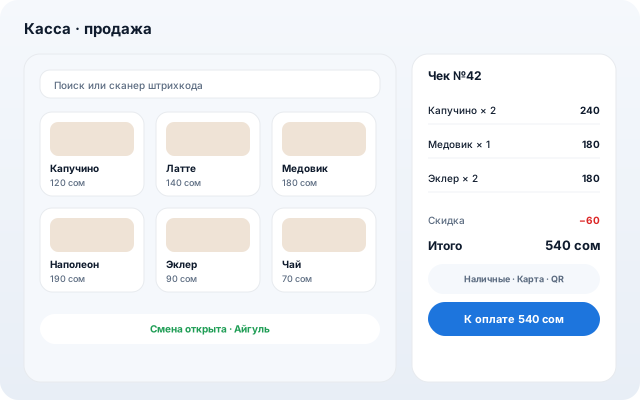
In-store sales: shift, receipt, payment by cash, card, QR or loyalty points. Items leave Inventory, revenue lands in Finance, the purchase joins the customer history.
For retail, coffee shops, bakeries and salons. Works on a tablet and a laptop alike: touch tiles and keyboard shortcuts at the same time.
What it does
Shift, receipt, change
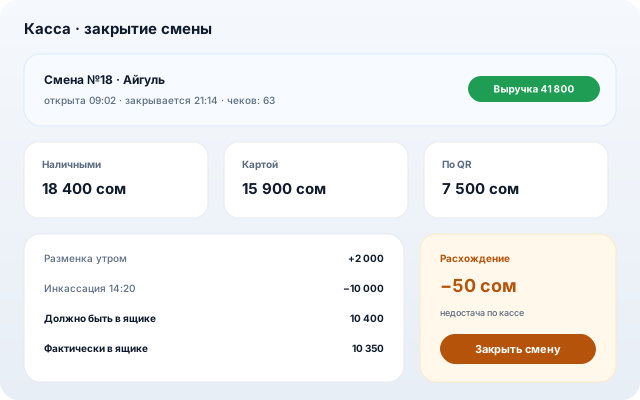
Open and close a shift with the cash difference, X and Z reports, cash drawer moves: float, pickups, payouts.
Pay any way
Cash, card, Finik QR, loyalty points — one receipt can be split across several methods.
Stock and money reconcile themselves
Sold items leave Inventory, revenue lands in Finance, a refund reverses both — no manual re-entry.
The customer is recognised
A code from the customer app, a QR or a phone number: points are spent and earned right inside the receipt.
A dropped connection keeps the receipt
Internet gone — the receipt is stored and sent once the link is back. A retry never creates a second one.
How to set up
- 1
Install Point of Sale from the store and create a register.
- 2
Pick the warehouse it sells from and the account revenue lands in.
- 3
Open a shift and sell: search, barcode scanner or product tiles.
Other apps