
The core
Asana-grade tasks next to your CRM and chat
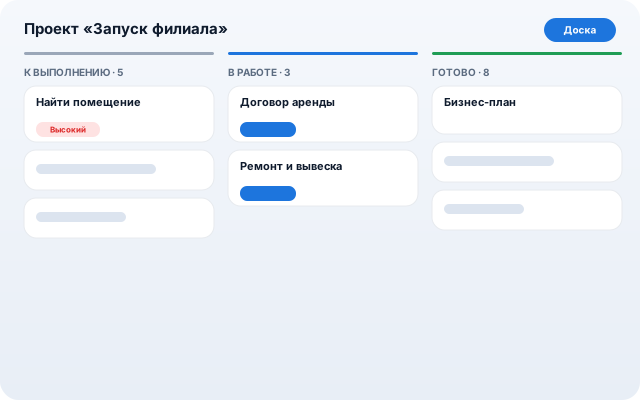
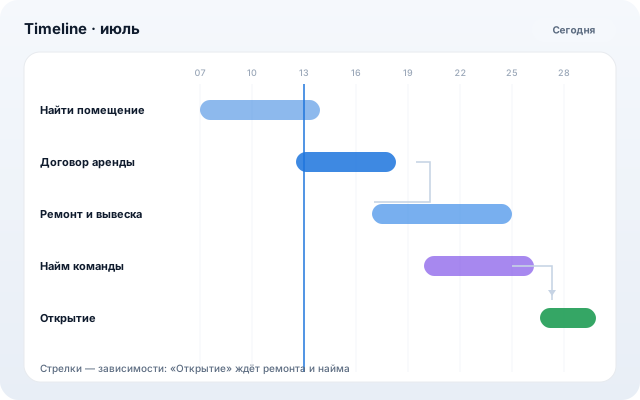
Projects, team groups and four views: kanban, list, calendar and timeline (a Gantt chart with dependencies). Subtasks, dependencies, recurrence and intake forms.
For teams tired of switching between a task tracker and a CRM: a task is created from a customer message, a deal, or by talking to AI.
What it does
Four views
Kanban, a list with due-date sections, a calendar and a timeline with dependency arrows and drag-to-reschedule.
“My tasks” by due date
Overdue, today, this week — smart sections. Get assigned a task — receive a notification and a push on your phone.
Dependencies and recurrence
Blocking tasks prevent closing work early; recurring tasks clone themselves on schedule.
Forms and an activity log
A public intake form drops submissions straight into the project as tasks. Every action is logged in task history.
AI helps you run it
Quick capture in plain text — AI parses the deadline and priority. AI assignee suggestions account for team workload.
How to start
- 1
Create a project — “To do / In progress / Done” columns are ready.
- 2
Organize the team into groups and share project access.
- 3
Link with CRM: a deal's next step automatically appears in the owner's “My tasks”.
The rest of the core