
The core
No Slack needed: team chat is built in
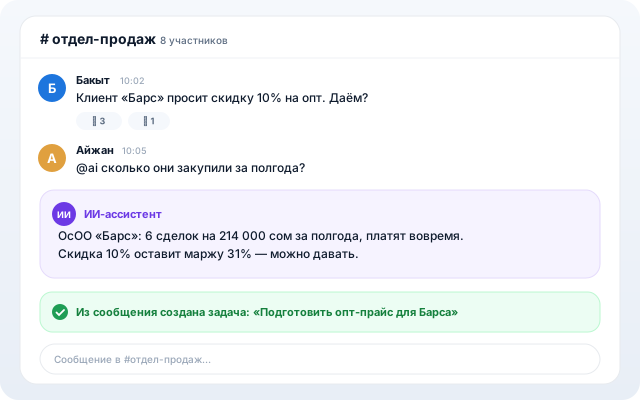
Channels, DMs and discussions right on a deal or a task. @ai answers in channels using your workspace data, voice messages get transcribed, “what did I miss” is one click away.
For teams that discuss work in Telegram but work in another system. Here the discussion lives next to the work itself.
What it does
Channels and DMs
Public and private channels, direct messages, reactions, pins, quotes, forwarding — a familiar messenger inside your workspace.
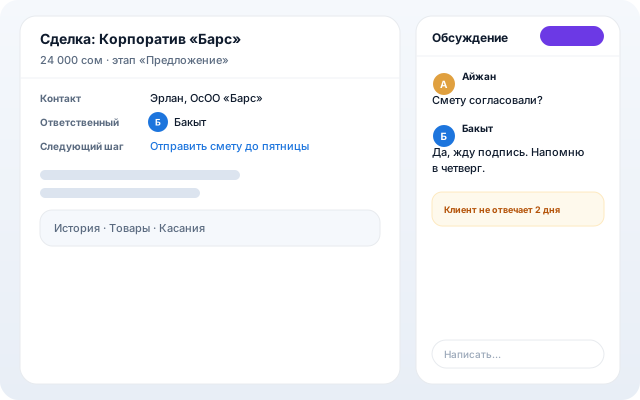
Discussions on deals and tasks
A thread opens right in the deal or task card — context and conversation never drift apart.
@ai in a channel
Mention @ai and the assistant replies in the thread, seeing your CRM, tasks and documents. Turn any message into a task in one tap.
“What did I miss”
Back from vacation — one click, and AI condenses everything unread across channels into a short digest.
Voice, polls, reminders
Voice messages with transcription, Telegram-style polls and quizzes, “remind me about this message” with presets.
How to start
- 1
The “General” channel already exists — teammates join it automatically.
- 2
Create channels per team and project, private ones for management.
- 3
Invite @ai into discussions: digests, answers grounded in workspace data, tasks from messages.
The rest of the core